Happy Monday and welcome back to The Breakdown AI.
Big week in the AI world.
OpenAI is printing money, Sam Altman shook hands with the Pentagon, and Elon Musk said some things in a deposition that... well, we’ll get to that. Grab a drink and let’s get into it.
Here’s what we’re covering today:
ChatGPT hits 900M weekly active users
OpenAI raises $110B in a historic funding round
Sam Altman strikes a Pentagon deal with guardrails included
Musk goes off on OpenAI in a deposition
How to use Claude to prep for a job interview in any industry
Trending AI tools you should know about
THIS WEEK IN AI
1. ChatGPT reaches 900M weekly active users
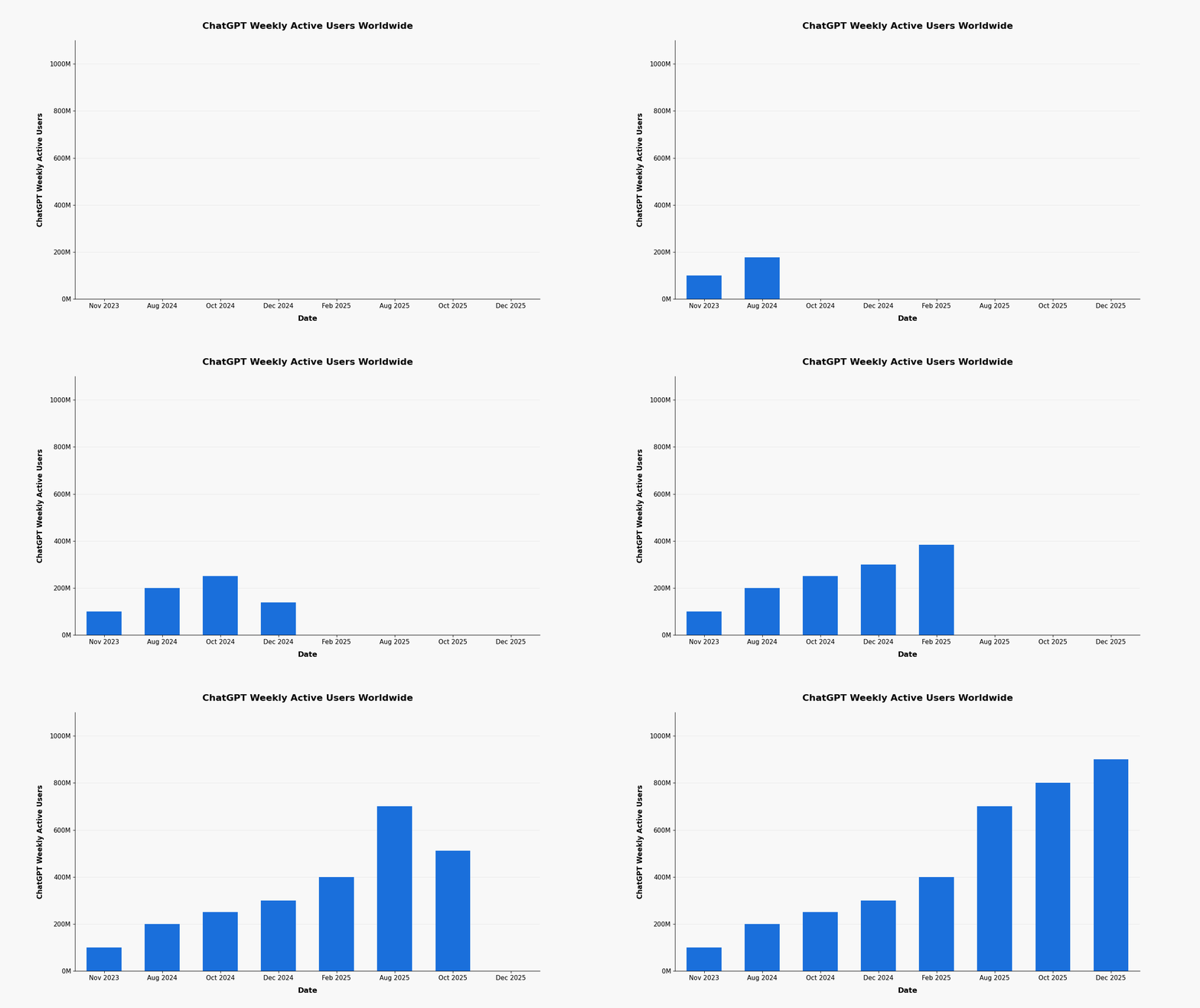
OpenAI announced that ChatGPT now has 900 million weekly active users, up from 800M just a few months ago, plus 50 million paying subscribers. January and February are both on track to be the biggest months for new subscribers in the company’s history. At this rate, the 1-billion mark isn’t far off at all.
2. OpenAI raises $110B in one of the largest private funding rounds ever
Amazon, Nvidia, and SoftBank collectively put $110 billion into OpenAI at a $730B valuation. The deal comes with massive infrastructure partnerships and the round is still open, meaning more investors are expected to join. For context, OpenAI’s previous round was $40B at a $300B valuation. That was just last year.
3. Sam Altman announces a Pentagon deal with safety protections built in
OpenAI has signed an agreement with the Department of Defense to run its models on classified networks, something Anthropic recently couldn’t pull off. Altman says the deal explicitly bans domestic mass surveillance and autonomous weapons, and he’s asking the Pentagon to offer the same terms to every AI company.
4. Musk goes after OpenAI in deposition and says nobody died because of Grok
In a newly released deposition for his lawsuit against OpenAI, Elon Musk attacked ChatGPT’s safety record and praised xAI by comparison. The problem is that Grok recently generated nonconsensual nude images, some reportedly of minors, which is now being investigated by the California AG and the EU. The jury trial is expected next month.
MY TAKE:
OpenAI is having a genuinely insane week. $110B raised, 900M users, and a Pentagon deal that nobody expected to come with actual safety language.
The interesting part is how Altman handled the whole Anthropic situation. Anthropic stood firm on its principles, got into a public fight with the White House, and walked away with nothing. Altman came in quieter, negotiated his terms, and walked out looking like the reasonable one. Whether you agree with the outcome or not, it was a smart play.
The Musk deposition is something else entirely. Saying nobody died because of Grok, right as your own platform is under investigation for generating CSAM, is a statement that did not land the way he intended. The lawsuit against OpenAI has been going on for a while now and it keeps getting messier.
Zooming out a little, the bigger story here is scale. When a company raises $110B and is weeks away from a billion weekly users, we’re past the era of AI being a research project. This is infrastructure now. The real competition isn’t about who has the best model anymore. It’s about who can build fast enough to serve the world.
HOW TO USE CLAUDE TO PREP FOR A JOB INTERVIEW IN ANY INDUSTRY
Most people walk into interviews either overprepared on generic questions or underprepared on the stuff that actually gets asked. Claude fixes both problems fast. Here is a simple way to use it before your next interview.
Step 1. Give Claude your context
Start by telling Claude exactly what you are walking into. The role, the company, and your background. The more specific you are, the better it performs.
Context prompt
"I have an interview for a [JOB TITLE] role at [COMPANY NAME]. The company is in the [INDUSTRY] space and here is the job description: [PASTE JD]. My background is [BRIEF SUMMARY OF YOUR EXPERIENCE]. Keep this context in mind for everything I ask you next."
Step 2. Get the likely interview questions
Once Claude has the context, ask it to predict what you will actually be asked. Not just the boring generic list but questions specific to the role and company.
Question prediction prompt
"Based on everything I just shared, give me the 10 most likely interview questions they will ask me. Include a mix of behavioral, technical, and situational questions. For each one, briefly explain why an interviewer for this specific role would ask it."
Step 3. Practice your answers out loud with Claude
This is where it gets genuinely useful. Paste one of the questions back to Claude, write your answer the way you would actually say it, and ask Claude to give you feedback.
Answer feedback prompt
"Here is the question: [QUESTION]. Here is how I would answer it: [YOUR ANSWER]. Give me honest feedback. Tell me what landed, what was vague or weak, and how I can tighten it up. Then show me a stronger version of my answer using my own experience."
Step 4. Prepare smart questions to ask them
Interviews go both ways and most candidates blank on this part. Claude can help you show up with questions that actually make you look like you did your homework.
Questions to ask prompt
"Based on the role and company, give me 5 thoughtful questions I can ask the interviewer at the end. Make them specific enough to show I understand the industry and the role, not generic questions they have heard a hundred times."
That is the whole workflow. Context in, questions out, practice your answers, walk in prepared. Takes maybe 30 to 45 minutes and most people who do this show up noticeably more confident than candidates who wing it.
TRENDING TOOLS
Three tools worth checking out this week.
Perplexity AI
Think of it as Google but with a brain. Perplexity gives you direct answers to your questions with cited sources pulled in real time. Great for research when you want answers, not ten more tabs to open.
Gamma
Give it a topic or paste in some notes and it builds you a solid presentation in seconds. Not exaggerating. This will save you a serious amount of time the next time you need a deck.
Elicit
An AI research assistant built specifically for academic papers. It helps you find, summarize, and compare studies without spending hours digging through Google Scholar. Useful if you want the actual data behind the headlines.
Thank you for reading today’s edition. See you next time!