Welcome back to The Breakdown AI.
This week we have Facebook finally letting you talk back to its algorithm, Apple dragging OpenAI to court over hiring practices, a chipmaker CEO telling AI doomers to take it down a notch, and one of the most-used AI apps on the planet filing for bankruptcy.
Busy week. So, let’s get into it.
Here’s what we’re covering today:
• Facebook lets users control their own algorithm with plain English
• A judge orders OpenAI to hand over hiring records in Apple’s trade secrets case
• Cerebras CEO tells AI doomers to dial it back
• Character.AI files for bankruptcy just five years in
• How to build your first AI agent
• Trending AI tools you should know about
THIS WEEK IN AI
1. Facebook lets users control their own algorithm using natural language
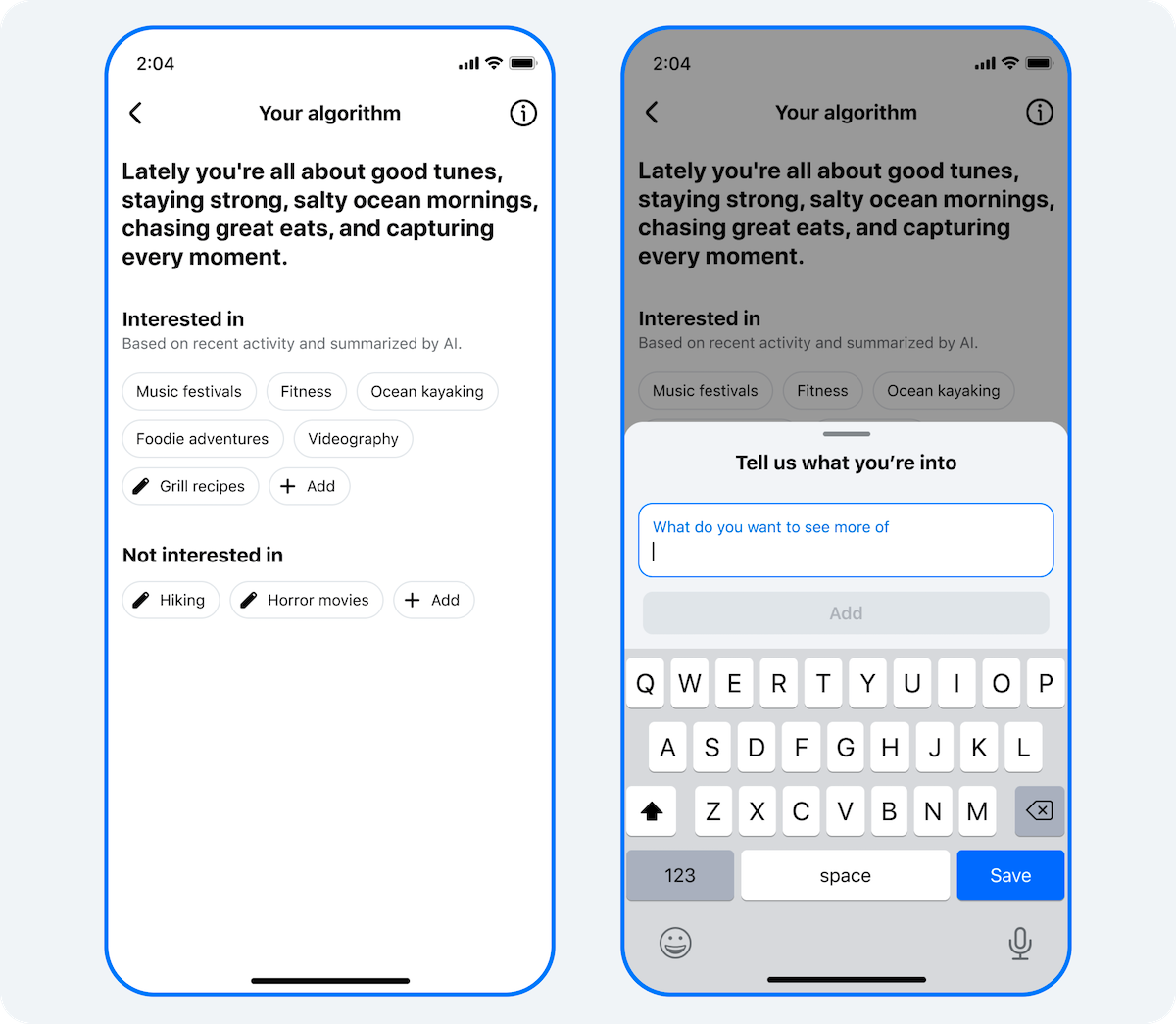
Meta launched a feature called Your Algorithm on Facebook this week, letting users describe in their own words what they want to see more or less of in their feed and Reels. The platform responds in real time and can ask follow-up questions to get more specific. The feature was already on Instagram and Threads has a similar one called Dear Algo.
The Breakdown: This is not a small UI update. For years, social media feeds operated as black boxes.
The algorithm decided what you saw and you had two options: engage with it or not.
Giving users a natural language interface to talk directly to the ranking system is a meaningful shift. It also happens to be a smart business move for Meta. The more the feed surfaces content people actually want, the longer they stay, and the more ads they see.
Why it matters: It signals where AI is going inside consumer products. The next generation of apps will not just make decisions for you, they will let you negotiate with those decisions in plain language. Meta is testing that model at scale across billions of users. The data it collects on how people describe what they want will be genuinely valuable for training better recommendation systems.

2. A judge orders OpenAI to hand over hiring records in Apple’s trade secrets case
A federal judge ruled that Apple can access OpenAI’s interview records for former Apple employees who applied to its consumer hardware and robotics teams. This includes interview checklists, technical presentations, and any records showing that Apple technology came up during those interviews. Apple alleges that departing employees took confidential files and that some even coached others on what to bring to OpenAI interviews.
The Breakdown: OpenAI is building hardware. That much is public. What is less public is how much of what it is building draws on knowledge that walked out of Apple’s doors.
The fact that a judge expedited this particular request, rather than letting it sit in a slow discovery process, suggests the court found Apple’s argument credible enough to act on quickly.
The three people flagged for depositions, including OpenAI’s chief hardware officer, are all former Apple employees.
Why it matters: This case is a preview of a legal pattern that will keep repeating as AI labs race to build physical products. The talent pool is small, the knowledge is concentrated, and the lines between what someone knows and what they are allowed to share are genuinely blurry. How this case resolves will set expectations for how aggressively companies can recruit from each other in the hardware space.

3. Cerebras CEO tells AI doomers to stop scaring people
At TechCrunch Disrupt, Cerebras CEO Andrew Feldman said some AI leaders probably should not be allowed to talk in public, referencing the growing wave of doomsday predictions from inside the industry. He argued that the positive potential of AI, like eventually eliminating cancer, is getting drowned out by existential risk narratives. He also acknowledged that the data center industry failed to engage local communities properly, which has fueled some of the backlash.
The Breakdown: Feldman has skin in the game here. His customers include OpenAI, Figma, and GSK, so he needs AI to be seen as a net positive.
But his underlying point is not wrong.
The public conversation about AI risk has become increasingly detached from the actual experience most people have with the technology. When Anthropic’s CEO ends up in an SNL skit about building things he believes are dangerous, something has shifted in how this industry is perceived.
Why it matters: The tension he is pointing at is real. AI labs need public trust to operate, build data centers, and attract talent. Constant doomsday framing from insiders makes that harder. At the same time, dismissing risk entirely is irresponsible. The industry has not figured out how to hold both things at once in a way the public finds credible.
4. Character.AI files for bankruptcy just five years after launch
Character.AI, the platform that let users chat with custom AI characters, has filed for Chapter 11 bankruptcy with assets and liabilities between $50 million and $100 million. It has agreed to sell some assets to Disney for $20 million. The company had 20 million monthly active users as recently as late 2024 but was hit with lawsuits, including one tied to the suicide of a 14-year-old user, and could never find a sustainable way to monetize its massive engagement.
The Breakdown: Character.AI had one of the most impressive engagement numbers in consumer AI. Users were spending over two hours a day on the platform. That is remarkable. But engagement and revenue are not the same thing, and in AI products, the gap between them is brutal.
The more people use an AI app, the more inference costs you pay. Character.AI was essentially subsidizing millions of hours of conversation it could not find a way to charge for at scale.
Why it matters: This is a cautionary tale for the whole consumer AI space. High engagement does not protect you if your cost structure does not work. Building on top of frontier models without owning the underlying infrastructure is expensive, and when you add legal liability into the mix, the runway disappears fast. A lot of AI startups have the engagement story. Very few have figured out the unit economics.
HOW TO BUILD YOUR FIRST AI AGENT
Everyone is talking about AI agents, but most explanations make them sound more complicated than they are.
Here is the honest and simple version:
An AI agent is just an AI that can take actions, not just answer questions. Instead of giving you a to-do list, it goes and does the things on the list.
You do not need to write code to build one.
Here is how to get your first agent running using tools that already exist.
Step 1. Pick a task worth automating
A good first agent does one thing well.
Think of something repetitive you do every week that involves moving information from one place to another.
Research and summarize, read and reply, find and organize. Start narrow.
Good examples are: an agent that monitors AI news and sends you a daily brief, an agent that reads your emails and drafts replies, an agent that takes meeting notes and turns them into action items.
Step 2. Choose your tool
You have three practical options depending on how technical you want to get.
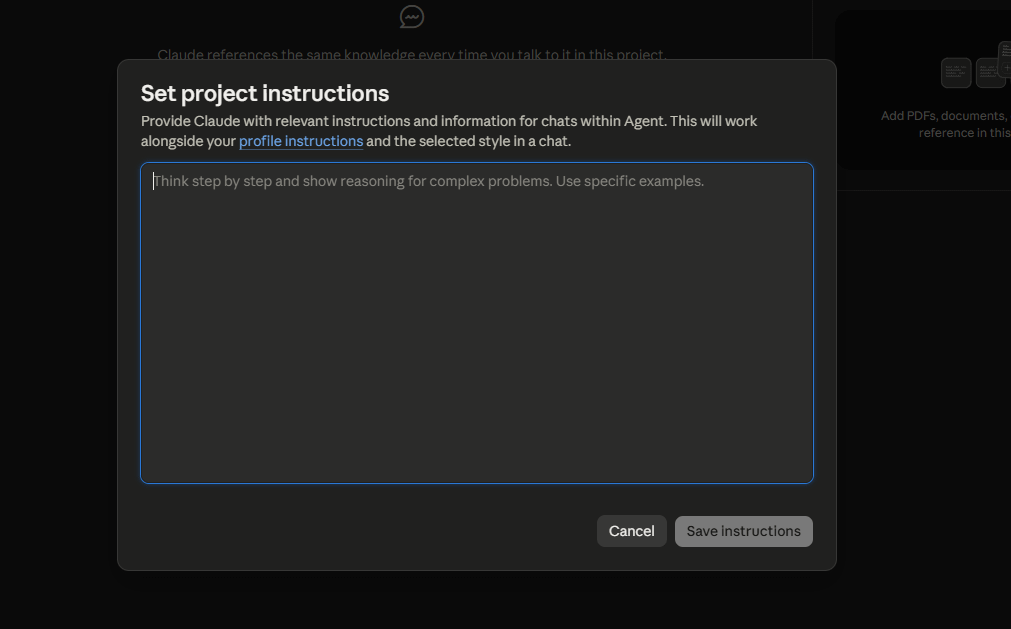
Claude.ai with Projects is the simplest starting point.

Set up a Project, give it a custom instruction set describing what you want it to do, and use it as a focused agent for that task. No setup required.
n8n or Make are workflow automation tools that connect apps together.
You can build an agent that pulls data from one source, sends it to Claude or GPT for processing, and pushes the result somewhere else. Visual, no code needed for basic flows.
Replit or Cursor are for people comfortable writing a little code. You can build a more customized agent that runs on a schedule or responds to triggers.
Step 3. Write a clear agent instruction
This is the most important part. Your agent is only as good as the instruction you give it. Be specific about what it should do, what it should ignore, and what the output should look like.
Agent instruction template
“You are an agent that [SPECIFIC TASK]. Every time you run, you should [ACTION 1], then [ACTION 2], then [ACTION 3]. Always output the result as [FORMAT]. If you are unsure about something, [WHAT TO DO INSTEAD OF GUESSING]. Do not include [THINGS TO LEAVE OUT].”
Step 4. Test it on a small case first
Run it once manually before you automate it. Give it one real example of the task and check the output. Fix the instruction based on what it gets wrong. Then run it again. Do this three or four times before you let it run on autopilot.
Step 5. Add a review step before anything important goes out
For your first agent, build in a human checkpoint before any output that gets sent to someone else. Have the agent draft. Review it. Only remove that checkpoint once you trust the output consistently.
That is the whole framework.
One focused task, the right tool, a clear instruction, a test run, and a safety check.
Most people overthink this.
Start small, get one agent working well, and then build from there.
TOOLS OF THE WEEK
Five tools worth your attention this week.
1. Thinkcell Assist
An AI layer built on top of thinkcell, the presentation tool that consultants and finance teams swear by. It helps you build and update complex charts in PowerPoint faster by understanding what you are trying to show and filling in the structure for you.
2. Reclaim AI
A smart calendar tool that automatically schedules your tasks, habits, and focus time around your existing meetings. It protects your deep work hours and adjusts in real time when things shift. Good for anyone whose calendar controls them instead of the other way around.
3. Gamma
An AI presentation and document builder that turns a prompt or a rough outline into a polished deck in seconds. The output looks designed without you touching a single layout setting. Great for quick decks you would otherwise spend two hours formatting.
4. Copy AI
An AI-native go-to-market (GTM) and content creation platform that automates sales and marketing workflow
5. Viktor
An AI employee and coworker designed to operate inside Slack and Microsoft Teams. It connects with over 3,200 tools (such as Notion, GitHub, and HubSpot), retains workspace-wide context, and executes autonomous workflows.
Thank you for reading today’s edition. See you in the next one